
Module
Software Setup
Ubuntu, GNU Radio and the DSPIRA blocks, on a laptop, a flash drive or a Raspberry Pi.
11 lessons, in the order they are meant to be worked through
Overview Software Needed For the Horn Telescope
-
The horn telescope uses software defined radio (SDR) for collecting and processing the radio signals collected.
-
An SDR device (dongle) is needed for this system. See the SDR Options page.
-
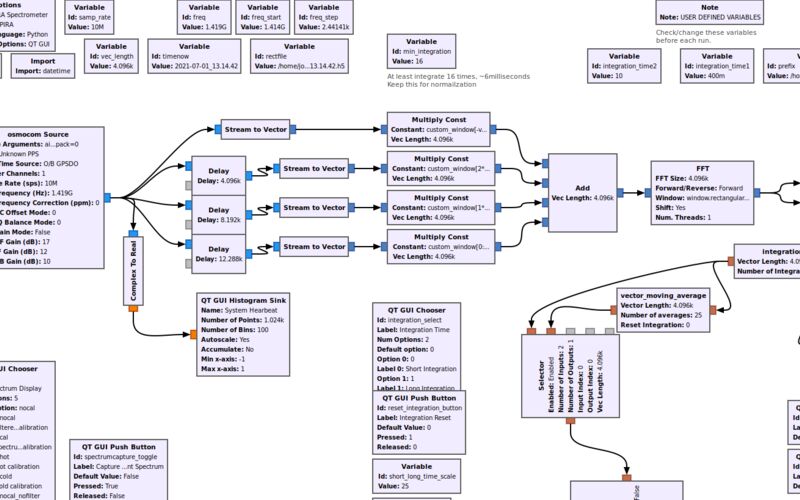
A computer receives the SDR data. A spectrometer program processes it at the telescope’s back end.
-
The spectrometer program called spectrometer_w_cal.grc runs on the free, open-source software GNU Radio on the Ubuntu operating system. The Installation of Ubuntu and SDR software on a Windows-based computer instructions cover the required software. They explain obtaining Ubuntu, GNU Radio, and spectrometer_w_cal.grc.
-
Instructions on how to use the spectrometer_w_cal.grc program can be found here.
-
Another option is to build a simple spectrometer program in GNU Radio. Instructions for doing this are provided below under Build a Simple Spectrometer in GNU Radio. These instructions teach GNU Radio, then introduce digital signal processing (DSP). The DSP lessons explain processes used in the spectrometer. Then steps on how to build a simple spectrometer in GNU Radio are provided.
Warning-Novice Computer Users - Does UBUNTU or Command Line Interface sound new to you? You may wish to read the following intro to the UBUNTU environment. What is UBUNTU? before you start downloading and setting up software.
Acquire Necessary Software:
-
Installation on a Bootable Flashdrive. This is DSPIRA’s preferred way to obtain the software needed for the horn telescope. A 32G flash drive lets users run the software on Windows-based computers without dedicating a PC to it. The bootable flash drive holds all required software: Ubuntu, GNU Radio, and spectrometer_w_cal.grc.
-
Installation of Ubuntu and SDR software on a Windows-based computer. Covers installing Ubuntu, GNU Radio, and spectrometer_w_cal.grc. APPLE COMPUTERS: DSPIRA has not successfully run GNU Radio on Apple computers. We therefore provide no Apple support material here.
Build a Simple Spectrometer in GNU Radio:
- Simple Spectrometer. Introduces GNU Radio, basic DSP lessons, and steps for building a spectrometer in GNU Radio.
11 lessons in this module
-
Computer and Software Needs for the Horn Telescope Spectrometer
Details on computer systems that can be used to operate the horn spectrometer
-
Steps for Installing Software on a Computer
Details of horn telescope software installation on a computer
-
The Command Line and Git
The handful of Linux commands and git steps the rest of these lessons assume you already know
-
Installing Ubuntu
Details for partitioning a hard drive and installing Ubuntu OS on a Windows computer
-
Installing Ubuntu 22.04 with spectrometer_w_cal.grc on Bootable Flashdrive
Instructions for copying the Ubuntu/spectrometer_w_cal image on a bootable flashdrive
-
Installing GNU Radio
Details for installing GNU Radio
-
Installing gr-radio_astro
Details for installing gr-radio_astro
-
Installing gr-radio_astro on Ubuntu 20.04
Details for installing gr-radio_astro on Ubuntu 20.04
-
Build a Simple Spectrometer
Introductory GNU Radio lessons are presented along with steps for building a simple spectrometer
-
Raspberry Pi
Details for setting up Raspberry Pi for Radio Astronomy
-
Download and Install WVURAIL Radio Astronomy OS for Raspberry Pi
Step by Step instructions for downloading and installing Radio Astronomy Operating System for Raspberry Pis.