
Procedure for Setting Up a 2 Horn Interferometer
Set up and run a two-horn interferometer with a Lime SDR and GNU Radio. The GNU Radio spectrometer programs write time-stamped data files once every integration time. The adding spectrometer is Interferometer_SimpleSpectrometer_Adding.grc. Its data includes spectra for horns A and B, plus power spectra from their summed signals. The multiplying spectrometer is Interferometer_SimpleSpectrometer_Multiplying.grc. Its data includes spectra for horns A and B, plus interference magnitude and phase.
-
List of Equipment
-
2 Horn telescopes, each consisting of:
- horn and can antennae
- cradle
- stand
- bolts for cradle axle
- clamps - recommended to secure the cradle position after the horn is aligned
-
Electronics
- computer with the GNU Radio spectrometer program on it:
- adding spectrometer program: Interferometer_SimpleSpectrometer_Adding.grc
- multiplying spectrometer program: Interferometer_SimpleSpectrometer_Multiplying.grc
- Lime SDR with USB cable to connect to a computer – This SDR can digitize 2 channels.
- 2 bias T’s for powering the LNA’s; the Lime does not provide power to the LNA’s.
- 5 V transformer to power the bias T’s
- 2 SMA cables to connect the Lime Rx outputs to the “RF” inputs of the bias T’s
- 2 long SMA cables to connect the “RF+dc” outputs of the bias T’s to the LNA’s
- 2 LNA’s
- computer with the GNU Radio spectrometer program on it:
-
Accessories for setting up
- duct tape - recommended for taping the devices and cables in place
- inclinometer - recommended for setting the telescope angle
- E-W (N-S) line - critical!
- best method: determined, prior to a run, from the shadow of a vertical pole or string at sun’s transit
- or determine using an accurate compass
- Large protractor to help orient the telescopes
- pliers for tightening the horn rotation axis
- string - can be useful for aiding the alignment of the horns relative to each other
- tape measure
- tent in case of rain
-
-
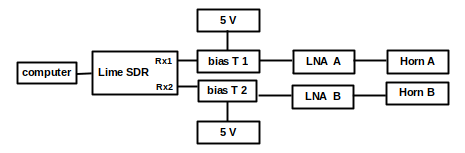
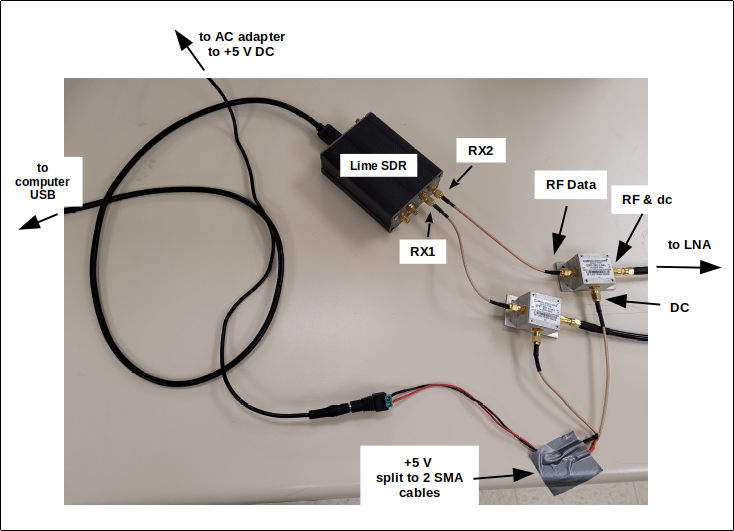
Schematic Diagram and photo of the electrical connections
-
Setting up the horns
- Assemble 2 horns as would be done for a single horn observation.
- For an east-west baseline, align the horns in parallel toward the same sky position (e.g. the transiting Sun).
- Here are some tips:
- Sometime before doing interferometry, establish the N-S direction marking the shadow of a vertical pole when the sun transits.
- For an east-west baseline, use a large compass or square. Mark the east-west direction perpendicular to north-south. A tape measure or string can be useful for doing this.
-
Setting up the electrical connections - REFER TO THE PHOTO ABOVE
- The cable connected to RX1 on the Lime SDR collects “Horn A” data. RX2 collects Horn B data.
- Plug in the 5 V dc transformer that powers the bias-T’s. Check that the power strip is on.
- The “RF” terminal of each bias-T is connected to the respective RX1 and RX2 on the Lime.
- The “RF + dc” terminal of each bias-T is connected to the respective LNA.
-
NOTE ABOUT COMPUTER POWER: Be sure the computer power settings are such that it does not go to sleep. Also, for longer runs it is recommended to have the computer plugged in during the run.
-
For Adding Interferometry:
-
Run the spectrometer program Interferometer_SimpleSpectrometer_Adding.grc
-
Plug the Lime SDR into a USB port.
-
On the computer set up the file directories for data collection:
-
Create a folder appropriately titled for the data collection, e.g. “Sun_scan_July21”. Be sure any folders and filenames have no spaces in them.
-
Run GNU Radio: $ gnuradio-companion
-
Open the Variable boxes described below in Interferometer_SimpleSpectrometer_Adding.grc. They are at the upper left of the GNU Radio canvas:
-
Open the “prefix_hornA” Variable block (double-click it). For “Value” type the pathname to the subfolder that will be used to collect the spectrum of Horn A. This must be in quotes. In this example, horn A data goes into “magnitude_july21”. That folder is inside “sun_july21”, which is inside “interferometer_data”. This will be written in the prefix-hornA Variable box as: “/home/john/dspira_2021/interferometer_data/sun_july21/hornA_july21/”
-
Set up similar file pathnames in the Variable blocks “prefix_hornB” and “prefix_adding”.
-
Be sure these sub-folders on the computer have been created.
-
-
-
If all is good, you are ready to go. Delete the test files in each folder (not required but recommended).
-
Start the program. Select “Long Integration” and “Writing to File”. If all is good, the graphs should show signals being collected.
-
-
For Multiplying Interferometry:
-
Run the spectrometer program Interferometer_SimpleSpectrometer_Multiplying.grc
-
Plug the Lime SDR into a USB port.
-
On the computer set up the file directories for data collection:
-
Create a folder appropriately titled for the data collection, e.g. “Sun_scan_July21”. Be sure any folders and filenames have no spaces in them.
-
Run GNU Radio: $ gnuradio-companion
-
Open the Variable boxes described below in Interferometer_SimpleSpectrometer_Multiplying.grc. They are at the upper left of the GNU Radio canvas:
-
Open the “prefix_mag” Variable block (double-click it). For “Value” type the pathname to the subfolder that will be used to collect the spectrum of Horn A. This must be in quotes. In this example, interference magnitude data goes into “magnitude_july21”. That folder is inside “sun_july21”, which is inside “interferometer_data”. This will be written in the prefix-mag Variable box as: “/home/john/dspira_2021/interferometer_data/sun_july21/magnitude_july21/”
-
Set up similar file pathnames in the Variable blocks “prefix_phase”, “prefix_hornA”, and “prefix_hornB”.
-
Be sure these sub-folders on the computer have been created.
-
-
-
If all is good, you are ready to go. Delete the test files in each folder (not required but recommended).
-
Start the program. Select “Long Integration” and “Writing to File”. If all is good, the graphs should show signals being collected.
-